You have dozens, possibly hundreds, of databases to manage. Most are small, non-production environments: dev clusters, staging replicas, QA sandboxes. They get used twice a month. But they still consume your time: making sure they were created to company standards, that backups are configured, that monitoring is in place, that someone didn't spin up a 32-core VM for a todo-list app.
Your team is capable. They understand their applications. They know what data they need and roughly what shape the database should take. What they don't have is the access, the guardrails, or the institutional knowledge to provision a database without creating a support ticket — addressed to you.
That's not a skills problem. It's an architecture problem. And 123Cluster solves it.
Every time a developer needs a new test database, they ask you. Every time someone needs a backup period extended, they ask you. Every time a QA environment needs to be rebuilt from scratch, they ask you.
The reason this keeps happening isn't that your team can't be trusted. It's that there has never been a safe way to hand over that control. Without resource limits, someone accidentally provisions a 32-core VM for a toy database. Without role-based access, one person's configuration change breaks someone else's cluster. Without an audit trail, you have no idea who changed what when something goes wrong.
So you stay the bottleneck. Because the alternative — until now — was chaos.
123Cluster is built around the idea that developers and junior team members can manage their own databases — within the boundaries that Ops defines and enforces. Here's what that looks like in practice.
Your team doesn't need to understand replication topology, WAL configuration, or autovacuum tuning to spin up a production-ready cluster. They choose the database type, the infrastructure target, and the size tier. 123Cluster handles the rest — correctly, every time.
Creating a standby replica, for example, is a drag operation: drop the standby icon onto the primary node. Replication is configured automatically, with the correct topology. No YAML, no CLI flags, no documentation to read.
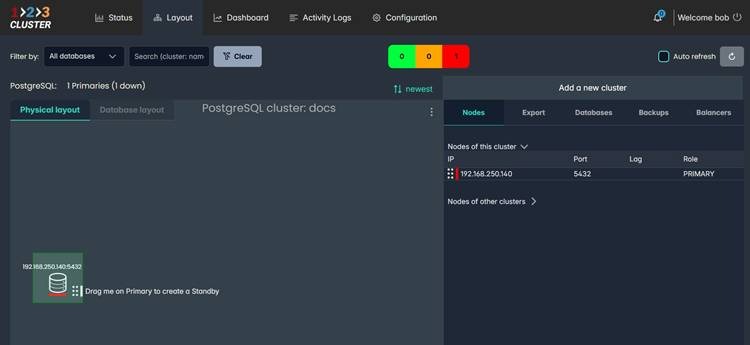
Layout view — drag the node icon onto the primary to create a Standby. 123Cluster handles the replication setup automatically.
Users are scoped to their own nodes by default. You can grant specific privileges to view or modify another team member's cluster — without giving blanket admin access. View rights and delete rights are configured separately, per database type.
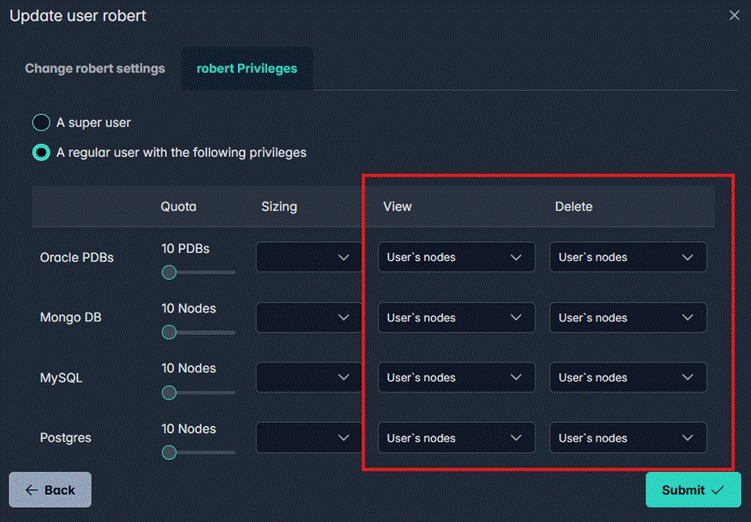
User Privileges panel — View and Delete rights are configured independently per database type
The Quota column shows how many nodes each user can create. The Sizing column controls which cluster size tiers they can access. Both are set per user, per database type.
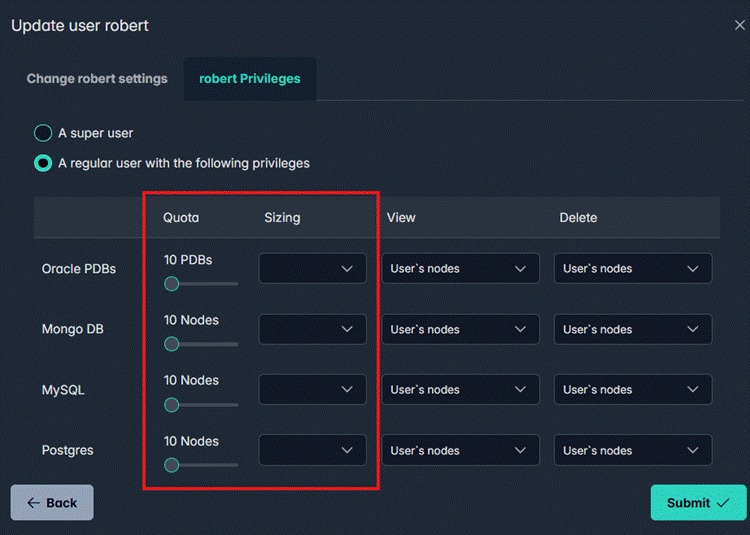
Quota and Sizing controls — each user's resource envelope is defined explicitly
Instead of letting users pick arbitrary CPU, memory, and disk combinations, you define named cluster tiers once. Every cluster created at a given tier matches those specifications exactly — backup policy included, mandatory.
A "Small PostgreSQL on Proxmox" cluster, for example, is configured as: 10 GB disk, 2 CPUs, 2 GB memory, 2-day local backup retention, 2-day cloud backup retention, 2-day export retention. A user can't accidentally create a too-large database or set a wrong backup policy — those values are locked to the tier definition.
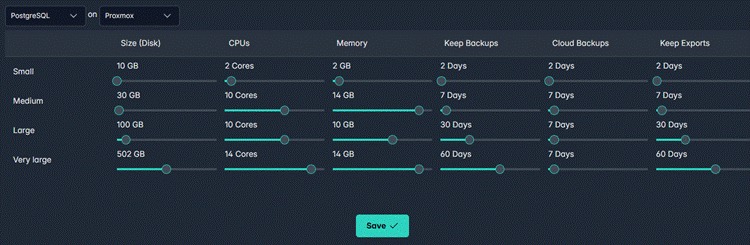
Cluster Sizing configuration — Small, Medium, Large, and Very Large tiers defined for PostgreSQL on Proxmox
Tiers are defined per database type and per infrastructure target. Once configured, they become the only options available to your team.
123Cluster supports Slack, Microsoft Teams, Telegram, and email notifications. Every team member configures their own: which events trigger a notification, which channel receives it, and a daily cap to prevent alert fatigue.
Admins can define organisation-wide defaults. Users can adjust their personal settings within the bounds you allow.
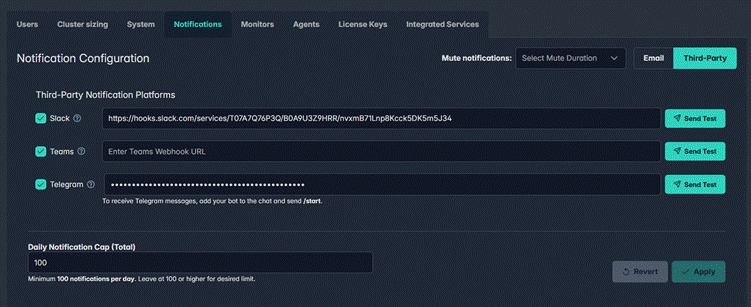
Notification Configuration — Slack, Teams, and Telegram webhooks configured with a daily notification cap
123Cluster ships with monitors for the metrics that matter: active sessions, replication lag, autovacuum activity, connection counts, cache hit rate, and more. What's different is that your team can change them.
The no-code monitor wizard — the same tool used to build 123Cluster's built-in monitors — is available to your users. Thresholds, alert levels, notification rules: all adjustable without writing a single line of code. If the default orange threshold for active/idle sessions doesn't match your application's traffic patterns, change it directly in the UI.
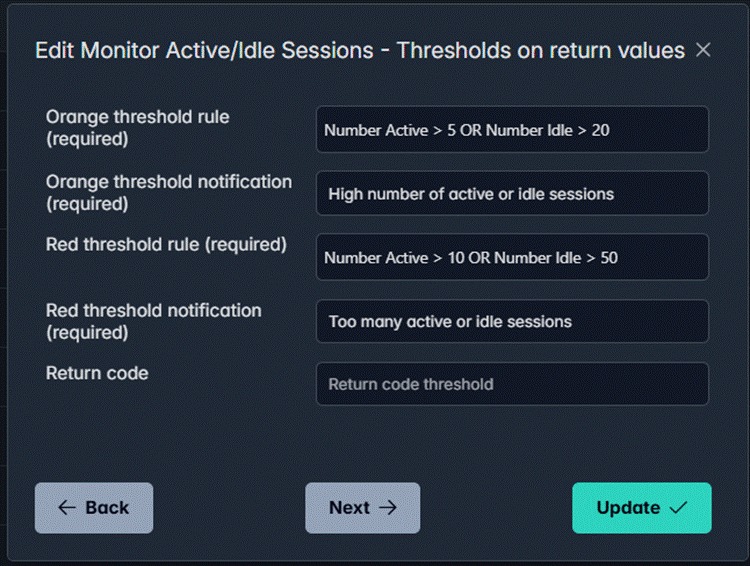
Monitor threshold editor — orange and red alert rules for Active/Idle Sessions, editable by any authorised user
123Cluster includes predefined dashboards at the organisation, node, and user level. Your team can extend these with additional metric graphs or build custom dashboards from any data point the platform tracks.
Adding a metric to an existing dashboard is a search-and-select operation. No configuration files, no JSON, no restarting anything.
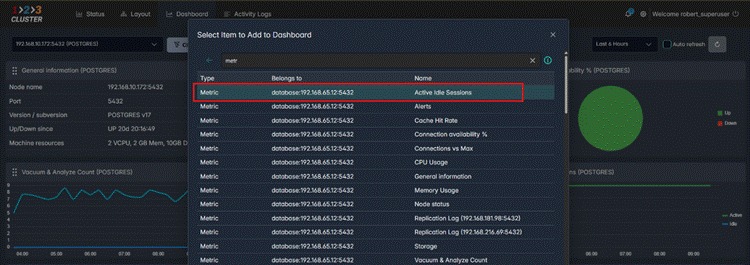
Adding the "Active Idle Sessions" metric to the predefined PostgreSQL node dashboard
When something goes wrong, "I don't know who changed that" is not an acceptable answer. Every user action in 123Cluster is logged: provisioning, configuration changes, deletions, privilege modifications. Admins can configure real-time notifications for any event category.
The audit trail is searchable and filterable. When an incident happens, you find the cause in seconds, not by interviewing the team over Slack.
123Cluster manages clusters across VMware, Proxmox VE, Kubernetes, OpenShift, AWS EC2, Azure, GCP, and any Red Hat or Ubuntu machine you provide — all from a single interface.
Each infrastructure target is registered once by an administrator. From that point on, it's available to the team as a deployment option when creating new clusters.
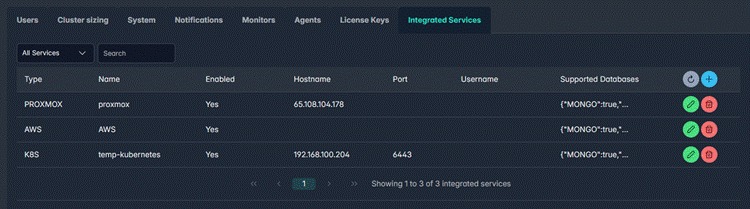
Integrated Services — Proxmox, AWS, and Kubernetes registered as infrastructure targets in a single configuration view
When a team member creates a new database, they select from the pre-registered services. No infrastructure credentials, no cloud console access required.
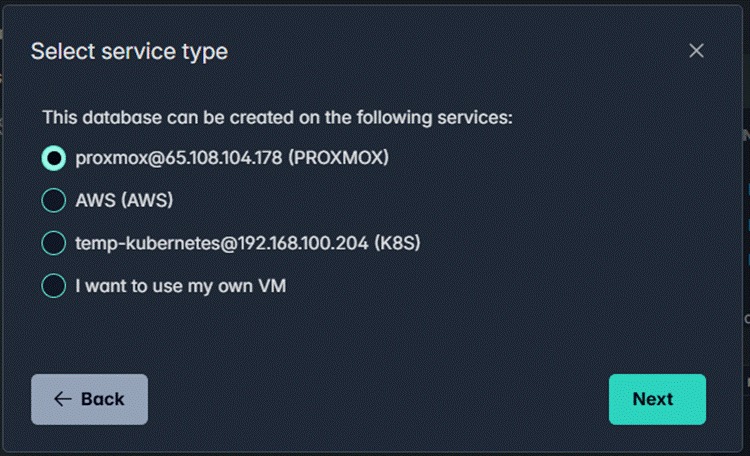
"Select service type" dialog — the team member picks from pre-registered infrastructure; Proxmox, AWS EC2, Kubernetes, or a custom VM
This lets you enforce environment-appropriate defaults: lightweight development clusters on Kubernetes or OpenShift, production workloads on dedicated VMs. The boundary is structural, not just a policy document nobody reads.
Your ticket queue drops. Developers get databases in minutes, not days. You stop being the single point of failure for infrastructure tasks that don't require your expertise.
And when something does need your attention — because eventually it will — you have the audit trail, the monitoring, and the alerting to find out exactly what happened and who did it.
Self-service doesn't mean no oversight. It means the right people handle the right tasks, with guardrails that scale as your team grows.
Ready to hand off database provisioning without handing over control? Read the 123Cluster DBaaS documentation or book a demo with the team.


Automate deployment, scaling, and maintenance of your database clusters to ensure peak performance and reliability.